What changes when a Magento store goes headless or Hyvä?
They are different architectures. A headless storefront decouples the frontend from Magento and talks to commerce services through APIs. It may render on the client, on a frontend server, at the edge, or through a hybrid of those approaches. Hyvä is not headless: it is a lighter Magento theme that keeps server-rendered PHP templates and replaces much of Luma’s JavaScript-heavy frontend stack. Both still need browser measurement because response time alone cannot describe the rendered journey.
Magento ships with the Luma theme, a frontend built on RequireJS, Knockout.js, and jQuery. Hyvä replaces much of that browser stack with Alpine.js and Tailwind CSS while continuing to render Magento templates on the server. A headless build discards Magento’s theme layer and puts a separate frontend in front of commerce APIs. The backend paths are not literally identical across every implementation, but cart, totals, inventory, and order work still depend on shared commerce services whose capacity matters.
That shared backend is the part most teams already know how to load test. The frontend is the part that has quietly become the larger share of what the user waits for, and it is the part a conventional load test cannot see. This article is about closing that gap: why a headless storefront is the clearest case for measuring render instead of response, where Hyvä changes the picture and where it does not, and how to test either one honestly.
When is a headless storefront JavaScript-heavy?
A client-rendered or heavily hydrated headless frontend can be JavaScript-heavy because it ships a framework runtime and application bundle, fetches data through APIs, then renders or hydrates in the browser. But headless does not require client-side rendering. Server-rendered, statically generated, and edge-rendered headless builds can send useful HTML before hydration. Test the implementation you have rather than treating “headless” as one rendering model.
The expensive step is hydration. When a headless site renders its HTML on the server for speed, the browser still has to download the matching JavaScript and re-run the component code to make the page interactive, the step the industry calls hydration. Until it finishes, the page can look complete while ignoring every tap and click. The cost is understood well enough that frameworks ship partial and progressive hydration specifically to limit it (patterns.dev, Progressive Hydration), because the work blocks the main thread and lands directly on Interaction to Next Paint.
Then there is the data. A headless storefront asks the backend for its content over GraphQL, often from the browser and often in dependent steps: fetch the category, then the products in it, then the price and stock for each. Apollo, which maintains the most widely used GraphQL client, calls these request waterfalls and treats them as a primary performance problem, because each request waits on the one before it. On Magento the waterfall carries a second cost: the platform serializes concurrent requests that share a session, a limit its issue tracker records against PWA Studio’s concurrent GraphQL calls directly. Under load, those client-side waits stack up where no server timing can show them.
This is not a fringe architecture. Adobe’s own headless toolkit, PWA Studio, drove a wave of React storefronts. Adobe has since pointed new builds at its Edge Delivery Services storefront and shipped no PWA Studio release since v14.5.1 in May 2024, but the React and Vue storefronts it inspired are in production today, many of them on Alokai, the platform formerly known as Vue Storefront. Many still run substantial browser-side JavaScript, even when useful HTML is rendered elsewhere first.
And building the page in the browser is not cheap. The median page now ships 558 KB of JavaScript on mobile and 613 KB on desktop, and the cost of running it lands on the main thread: the same Web Almanac 2024 data puts Total Blocking Time at the 75th percentile at 2,988 ms on mobile against 279 ms on desktop. A headless storefront sits at the heavy end of that distribution by design.
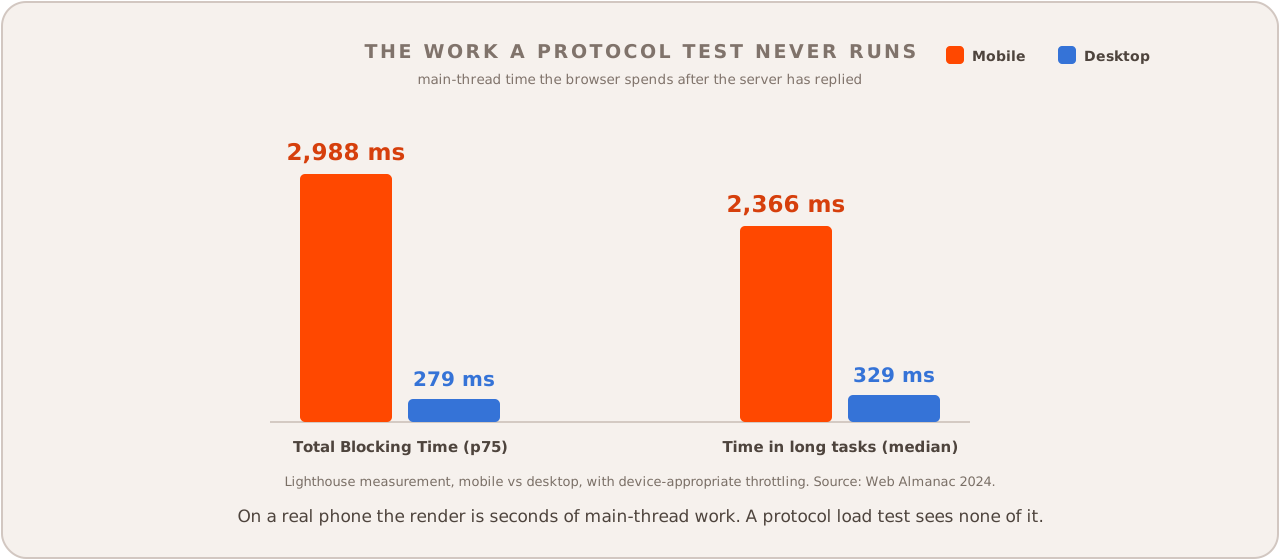
The gap is the device. Mobile CPUs have barely improved in five years, and a mid-tier Android phone runs JavaScript several times slower than a current iPhone, a low-end one closer to nine times slower (Alex Russell, The Performance Inequality Gap 2026). The customer on a real phone waits through every one of those milliseconds while the server, long since done, looks perfectly healthy.
Why does measuring response time miss the point?
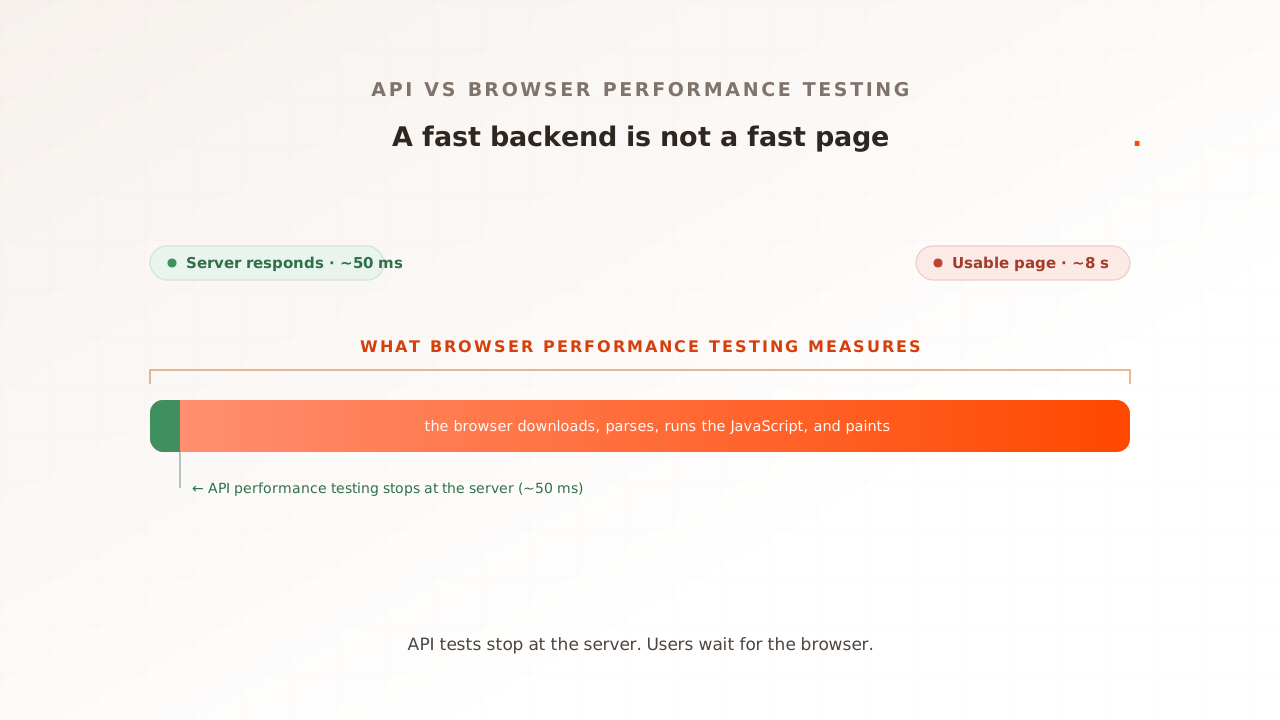
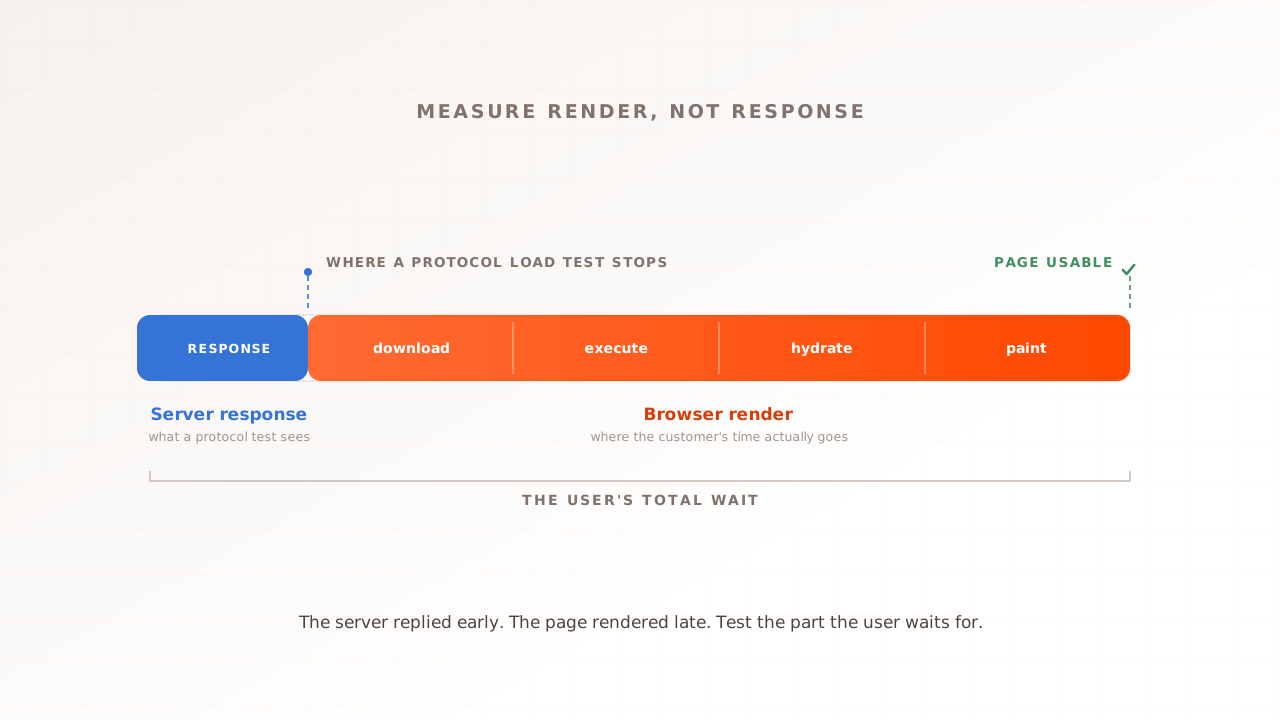
Because on a headless page the server’s response is a small fraction of what the user waits for. The GraphQL API can answer in 200 ms while the browser spends seconds downloading, parsing, executing, and hydrating before anything is usable. A protocol load test stops its stopwatch exactly where the headless work begins, then reports a fast number for the half of the job that was never the problem.
Picture it as two kinds of delivery. A server-rendered page arrives built, like furniture carried in assembled, and the van’s arrival is most of the wait. A headless page arrives flat-packed. The server sends the parts and the instructions, the JavaScript bundle and the data, and the customer’s browser has to assemble the furniture before anyone can use it. The van can be quick while the assembly is slow, and it is slower on a cheaper device with fewer tools. A protocol load test clocks the van. The customer is still on the floor with an Allen key.
Google says as much about the server’s half of the job. Time to First Byte, the moment the response starts arriving, is in web.dev’s words only a rough guide, and a server-rendered page can post a worse TTFB yet a better Largest Contentful Paint than a client-rendered one, because the work that decides the experience happens after the response. TTFB is not even a Core Web Vital.
Protocol load testing tools stop exactly there, by design. Apache JMeter, the most widely used of them, says it plainly in its own FAQ: JMeter “does not process Javascript or applets embedded in HTML pages.” Point it at a headless storefront and it will fetch the GraphQL responses and the HTML shell, time them, and report a fast result, while never running the React or Vue code that turns any of it into a page. The same limit is why Grafana built a separate browser module for k6: the protocol layer cannot see Core Web Vitals, so measuring them needs a real browser. The tools’ own makers draw the line in the same place we do.
| On a headless storefront | Protocol test (k6, JMeter) | Real-browser test |
|---|---|---|
| GraphQL and HTML response time | Yes | Yes |
| Downloads and runs the JS bundle | No | Yes |
| Hydration and client-side render | No | Yes |
| Core Web Vitals (LCP, INP, CLS) | No | Yes, natively |
| Third-party tags actually firing | No | Yes |
| What the customer could see and do | Inferred | Measured |
Where does Hyvä fit?
Hyvä attacks the same problem from the opposite end. Instead of adding JavaScript to build the page, it removes almost all of it. Hyvä swaps Luma’s RequireJS, Knockout, and jQuery for Alpine.js, around 7 KB gzipped, plus Tailwind, so the browser has very little to parse and run. The render gets faster because there is less render to do.
It has clearly struck a nerve. Hyvä reports over 6,400 live stores across 81 countries as of January 2026 and made its core theme free and open source in November 2025. For a frontend that began as a paid theme, that is real adoption.
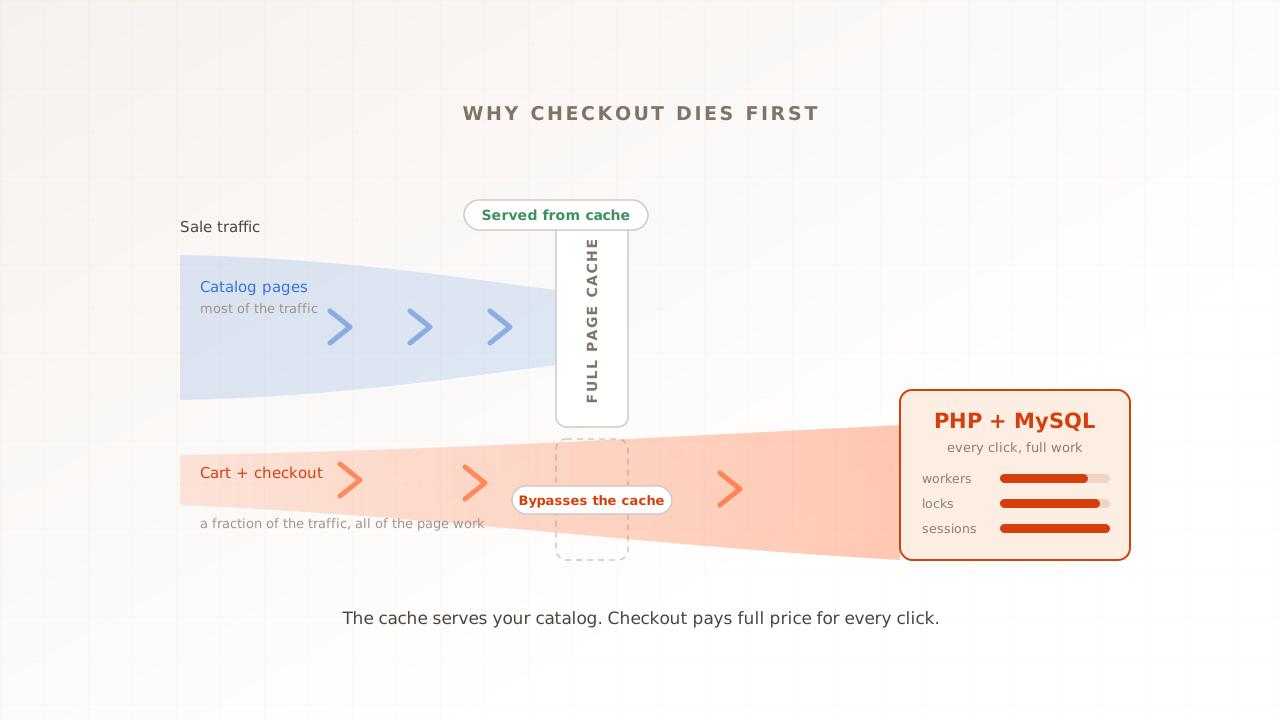
But Hyvä is a frontend theme, and that is the part to hold onto. It changes browser payload and template implementation; it does not remove Magento’s PHP, database, cart, totals, and order paths. It can change request patterns and frontend timing, so do not assume an identical numerical ceiling. Measure backend capacity directly. We have written about why Magento checkout dies first under load.
So a Hyvä store has two things worth testing, and they are different questions. Does the light frontend stay light under load, with Core Web Vitals holding as concurrency climbs? And does the backend journey, the checkout Hyvä leaves untouched, hold at peak? The first needs a real browser. The second is the backend ceiling every Magento store has, and the store-wide rehearsal for it is Magento load testing. A fast render on a quiet site is not a guarantee; render is measured under load or it is not measured at all.
How do you load test a headless or Hyvä storefront properly?
Run real browsers, not just HTTP requests, and read the render under load. Give each virtual user its own browser so it downloads the bundle, runs JavaScript, fetches data, and paints the page under selected test conditions. Do not treat that controlled result as identical to every customer’s device. Then read Core Web Vitals per step and test checkout capacity as its own question.
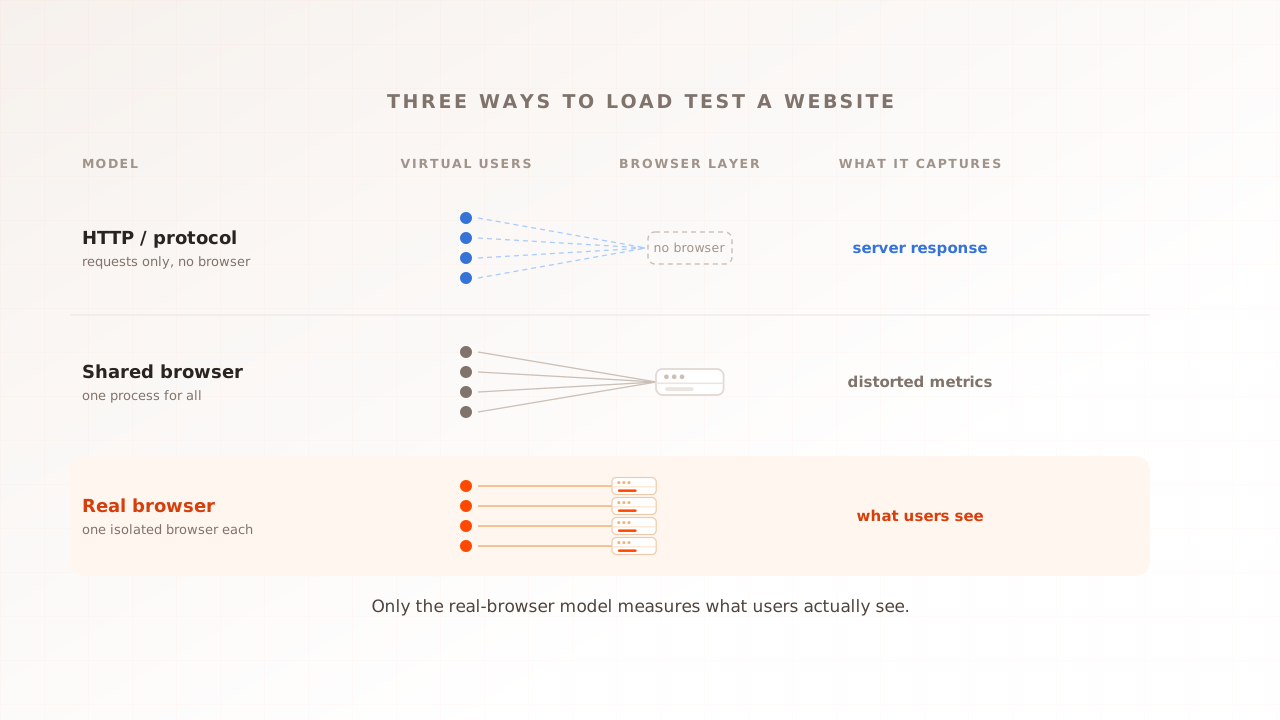
- Put a real browser on every virtual user. A virtual user is one simulated visitor the test drives. On a headless page, only a real browser runs the framework code, so only a real browser produces the render the customer sees. This is the real-browser load testing model, and for a JavaScript-built storefront it is the only model that measures the right thing.
- Measure render under load, not once. A single browser does not stress shared backends, CDNs, or third parties. Capture Core Web Vitals at concurrency while keeping enough generator headroom that the test rig does not distort browser metrics.
- Watch Interaction to Next Paint, not just load. Hydration makes a page look ready before it can respond, so Interaction to Next Paint is where a headless storefront’s main-thread cost surfaces. A page that paints fast and ignores the first three taps is failing the customer, and only an interaction measurement catches it.
- Follow the GraphQL waterfall. The client-side data fetches are where headless slowness hides. Keep the network log for each session so you can see which request stalled and what was queued behind it.
- Test the checkout ceiling separately, and on purpose. Ramp the full journey, browse, cart, checkout, past your expected peak until errors and response times climb together. This is the backend question, the same for Hyvä, Luma, or headless, and it is stress testing pointed at the path that fails first.
- Keep a protocol tool for the bare API. For raw GraphQL or REST concurrency with no rendering, an HTTP tool like k6 or JMeter is the lighter instrument. Run it against the API surface and a real-browser test against the render. The honest answer is both, aimed at different layers, and API versus browser performance testing covers where the line sits.
How Evaluat load tests a headless or Hyvä storefront
Evaluat is built on the real-browser model, the one this whole article argues for. Each virtual user runs in its own isolated browser, downloads the bundle, runs the framework, fetches over GraphQL, and renders the page, while the platform captures Largest Contentful Paint, Interaction to Next Paint, Cumulative Layout Shift, and First Contentful Paint per session under load. You build the journey once in a visual scenario editor with no scripting, Datasets give each virtual user its own login and search terms, popup handlers clear the cookie banners every storefront carries, and tests run from the region closest to your customers.
When the render gives way at peak, the evidence is a session, not a statistic. The per-URL view separates the category pages that held from the steps that did not; the network log of any session shows which GraphQL call stalled; the video shows the moment the page went blank or froze; the console log catches the error the framework threw. A failure at peak isn’t a percentile. It’s a session. Open the session. Watch the render break.
Two honest boundaries, the same ones that apply to every real-browser test. Evaluat watches the storefront from the outside: it shows which request was slow and what the customer experienced, but finding the slow GraphQL resolver inside PHP and MySQL still takes your server-side monitoring. And for raw protocol concurrency against the GraphQL API, an HTTP tool is the lighter instrument. The real-browser model earns its cost exactly where this article lives, on the JavaScript-built page where the server’s response and the customer’s experience have come apart.
Measure the render, not the response
Headless commerce separated the frontend from Magento, while Hyvä kept Magento’s server-rendered theme model and reduced browser-side weight. Both make the same testing lesson useful: server response is only one component of the customer journey. A load test that stops when the server replies cannot measure rendering, hydration, or interaction.
So measure the half that matters. Put a real browser on the journey, read Core Web Vitals as the load climbs, and keep the session for every render that breaks, so the slow one is something you watch rather than something you infer.
For stack-level positioning, see ecommerce performance testing and checkout under load.
Test in real browsers. Debug in real sessions. Book a demo.